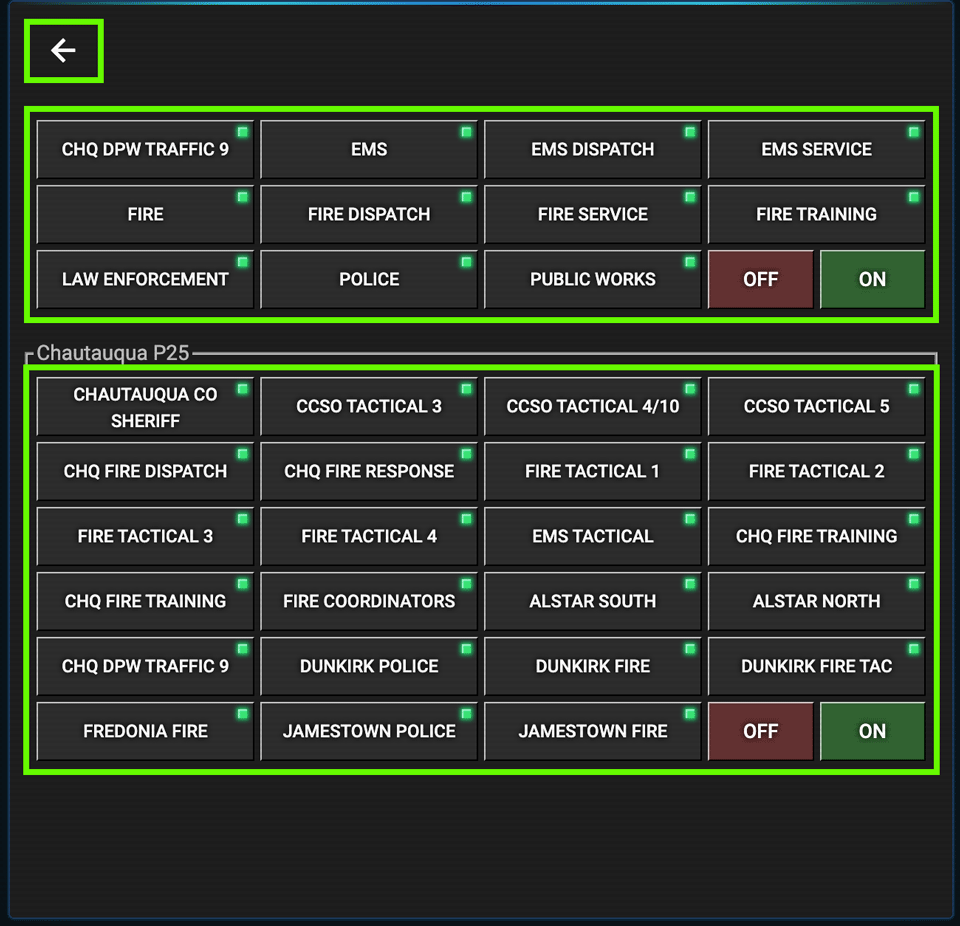
The Group/Tag Panel has the talkgroup categories and category tags. Categories are the type of agency. Tags are how a group of channels in a category are used. For example, FIRE is a category, and FIRE DISPATCH, FIRE SERVICE, and FIRE TRAINING are tags for that category. Currently, ScanCHQ has 4 FIRE DISPATCH talkgroups: Chautauqua Fire, Dunkirk Fire, Fredonia Fire, and Jamestown Fire.
The red [OFF] button turns off all Categories and Tags, and the [ON] button turns them all on.
If you only want to listen to FIRE radio transmissions, turn everything OFF, then click the FIRE button. The buttons FIRE, FIRE DISPATCH, FIRE SERVICE, and FIRE TRAINING will all turn on. If you decide to listen to the EMS transmissions too, just click the EMS button, and EMS, EMS DISPATCH and EMS SERVICE will turn on.
You can have a category on and decide which category tags to monitor. In our example with the FIRE category, you might want to only hear the FIRE DISPATCH transmissions. Then you click the FIRE SERVICE and FIRE TRAINING buttons to turn them off.
FIRE
├── FIRE DISPATCH
├── FIRE SERVICE
└── FIRE TRAINING
LAW ENFORCEMENT
├── POLICE
└── TACTICAL
EMS
├── EMS DISPATCH
└── EMS SERVICE
PUBLIC WORKS
└── TRAFFIC
OFF - Disconnected
ON - Active
PARTIAL ON
💡 TIP — If you see a TGID in the display that isn't labeled, check the Talkgroup Directory card on the main page for a description.