
Scanner Interface Guide
How It Works
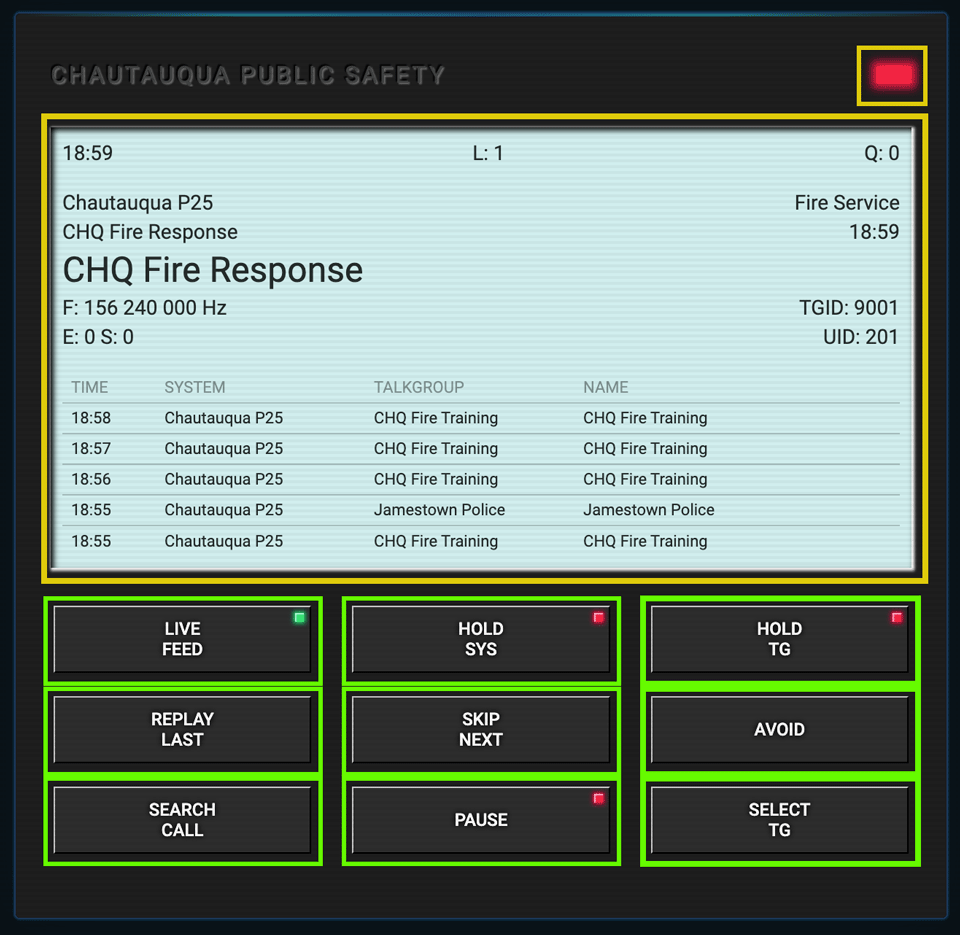
Click any highlighted zone on the scanner interface below to learn what each control does. Two features — Search Call and Select TG — open dedicated guide pages.
▶ Click the highlighted areas to explore
Display Panel
Group Indicator
Live Feed
Replay Last
Search Call
Hold Sys
Skip Next
Pause
Hold TG
Avoid
Select TG
Display Panel
Live call info, talkgroup, frequency, and recent history log.
Group Indicator
Color identifies the group type transmitting live.
Live Feed
Return to real-time scanning after using archive or hold features.
Replay Last
Instantly replay the most recent transmission you heard.
Search Call
Browse and search through archived calls. Opens full archive screen.
Hold Sys
Lock the scanner to one radio system and ignore all others.
Skip Next
Jump past the current transmission to the next active channel.
Pause
Freeze the scanner on the current channel — no auto-scan.
Hold TG
Lock onto a single talkgroup and monitor only that channel.
Avoid
Temporarily mute or skip the current talkgroup.
Select TG
Open the full talkgroup directory to enable/disable channels.